Command Line Usage
The inheritance_explorer includes a command line interface for producing
static graphs of inheritance structure. This functionality requires graphviz.
After installation, to see the command line help:
$ inheritance_explorer --help
Usage: inheritance_explorer [OPTIONS] MODULE_CLASS OUTPUT_FILE

    map a class and save the graph to a file. requires graphviz installation.

    MODULE_CLASS : the starting class to map from, must be of the form
    Module.Class Multiple modules may be specified, it is assumed the last entry
    is the class. For example, matplotlib.axes.Axes with map from Axes, which
    can be imported from matplotlib.axes

    OUTPUT_FILE : the output file for saving the graph

Options:
    --output_format TEXT  output format string (default is svg, or the file
                        extension of output_file)
    --import_list TEXT    comma-separated list of modules to import
    --funcname TEXT       function name to track
    --help                Show this message and exit.
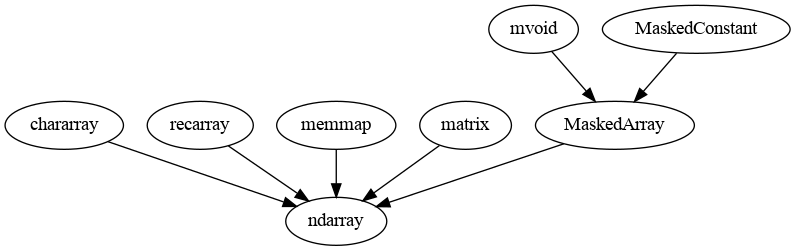
For example, to map out numpy.ndarray:
$ inheritance_explorer numpy.ndarray np_array_00.png
will result in the following image saved to np_array_00.png:
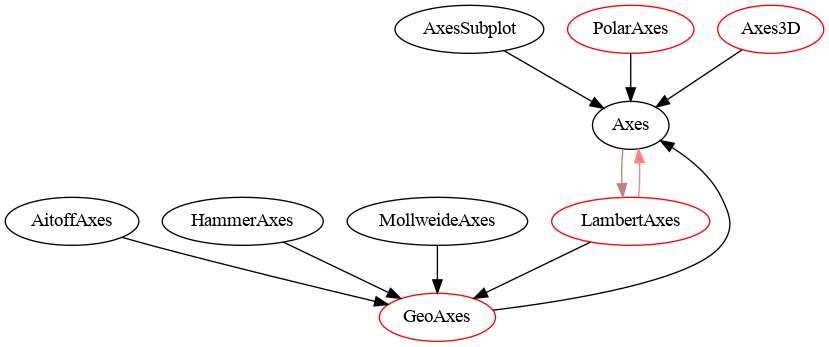
The following demonstrates how to track a function. Additionally, to specify a class that resides within nested modulues, simply include more period-separated modules:
$ inheritance_explorer --funcname clear matplotlib.axes.Axes mpl_axesclear.png
which results in:
Finally, you can use --import_list to specify a comma-separated list of
modules to import before the class is mapped. This controls the scope of
available modules so that you can map subclasses across modules. For example:
$ inheritance_explorer --import_list yt numpy.ndarray np_array_01_yt.png
will import yt before mapping child classes of numpy.ndarray, resulting
in

where we can see both the array sublcasses from unyt (one of the dependencies
for yt) and the yt subclasses of the unyt arrays (ImageArray
and YTPositionArray). Note that multiple modules may be specified, for example
--importlist yt,unyt.